
What is an external webcourse?
An external webcourse is a course that has not been created in Didac trainer. Such web courses are imported as either SCORM-packages, AICC-courses or xAPI activities.
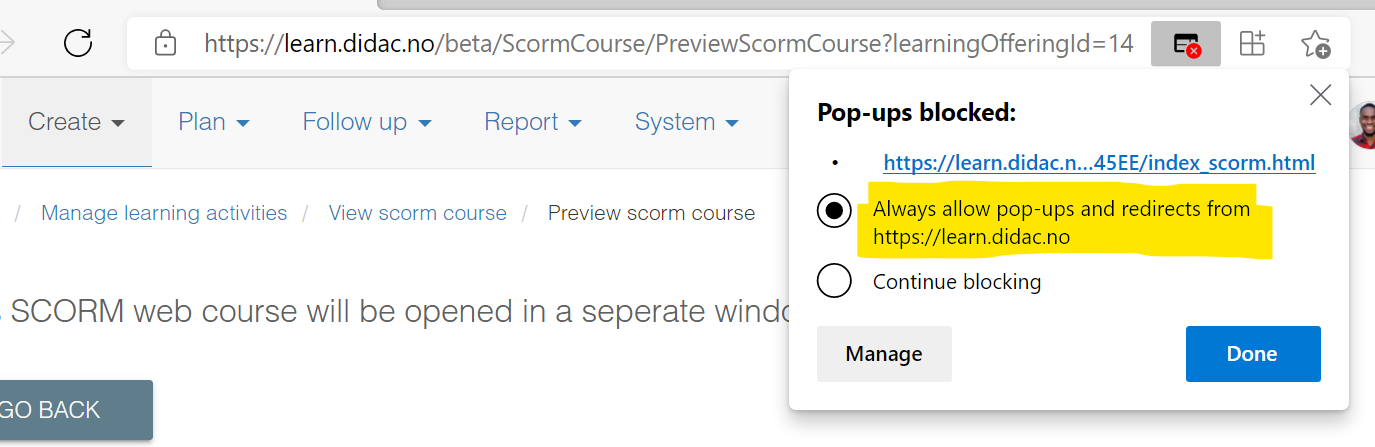
An external webcourse is automatically opened in an external window (popup). Most browsers Block popup windows and you must therefore turn off the popup-blocker before you are allowed to start and complete the webcourse.
In many modern browser, you han easily unblock the course window, by clicking on the window icon with the red x in the browsers address bar, and select "Always allow pop-ups...". Remember to click "Done" when you are ready:
If you are using a company PC or tablet, you can ask someone from your IT-department to assist you. If you are using your own device, you must turn off the popup-blocker yourself:
If you are using Google® Chrome:
https://support.google.com/chrome/answer/95472?co=GENIE.Platform%3DDesktop&hl=en
If you are using Microsoft® Edge:
https://support.microsoft.com/en-us/help/4026392/windows-block-pop-ups-in-microsoft-edge
If you are using Microsoft® Internet Explorer:
https://support.microsoft.com/nb-no/help/17479/windows-internet-explorer-11-change-security-privacy-settings
If you are using Safari on iPad/ iPhone:
Go to settings, select Safari, and then turn off the "Block popup windows" option.
Comments
0 comments
Please sign in to leave a comment.